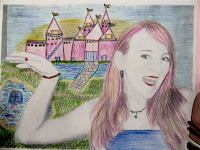
Here's a fun, easy, summer art project you can do at home with children of all ages. Start by taking a digital photographic portrait and print it out in black and white, or enlarge on a photo copier a portait on 8 x 10 paper. You child's school picture might be just perfect to use for this project!
Use acrylic or tempera paint or keep it simple with colored pencil. Inexpensive acrylic paint is available in small bottles at your local craft store. Be sure to have a variety of brush sizes on hand for large areas and detail work. Choose a palette of complementary colors such as green and red, blue and orange or yellow and purple to create visual contrast. Vary the brush strokes from smooth to bumpy, or impasto, type styles to increase visual interest.
Use the photograph as a guide to begin painting or 'coloring in' a self-portrait. Interesting effects can be obtained by leaving some areas such as the eyes or mouth unpainted so that the photographic information shows through. Reassure your artists at home that the final portrait does not need to be 'realistic.' That's the fun of painting!